Main System Platform

OpenScape 4000
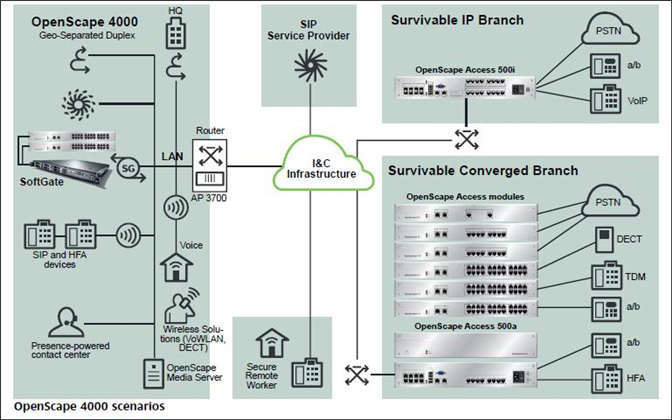
The OpenScape 4000 software installed on the Linux SLES 11 SP1 operating system offers a full set of converged enterprise-class communication features.
System features
- Integrated connectivity for analog, TDM, and VoIP subscribers
- Cost-saving Least Cost Routing for analog, TDM and IP trunks
- Integrated attendant functions
- Different time zones
- Multilingual user interfaces
- Virtual numbering plan
- Multi-tenant functionality
- Integrated FlexRouting for Contact Center
- Flexible configuration of local tones and announcements per branch office
- Branch survivability
- Gatekeeper redundancy for HFA subscribers
- Bandwidth resource manager for IP endpoints and branches
- Signaling (TLS) and Payload (SRTP) encryption for VoIP (Voice over IP) connections
- PKI integration for Signaling and Payload encryption
- CTI integration of busin
 ess applications via CSTA III ASN1, CSTA XML XML Phones Services interface for easy and cost-effective workflow integration
 - Call detail recording
- Display of a picture from an LDAP directory in a call
- Integration of SIP-based video endpoints
- Emergency dialing
- Multi-Level Precedence and Preemption (MLPP)
User features
- Redial
- Speed dialing system/individual
- Name key
- Call journal
- Toggling
- Call transfer
- Call deflection
- Callback
- Message Waiting Indication
- Call waiting
- Call park
- Directed call park
- Do Not Disturb
- Flexible and enhanced call forwarding
- Eight-party conference
- Direct station selection key function
- Override and prevention of override
- Hotline
- Mobile HFA
(network-wide user mobility) - Personal ID number (PIN)
- Executive/secretary functions
- Intercom features
- Integrated multi-line key functionality
- Network-wide hunt groups
- Network-wide pickup groups
- One-Number service – simultaneous ringing
- Charge display
- Acoustic and visual status for Signaling and Payload encryption
- … and much more
Regardless of whether you provide the desktops of your staff with digital system phones or IP phones of the
OpenStage family, the handling or, respectively, the user interface to activate the features is identical on all phones.

OpenScape X8
- All-in-one solution for small and medium-sized enterprises
- Uniform solution architecture
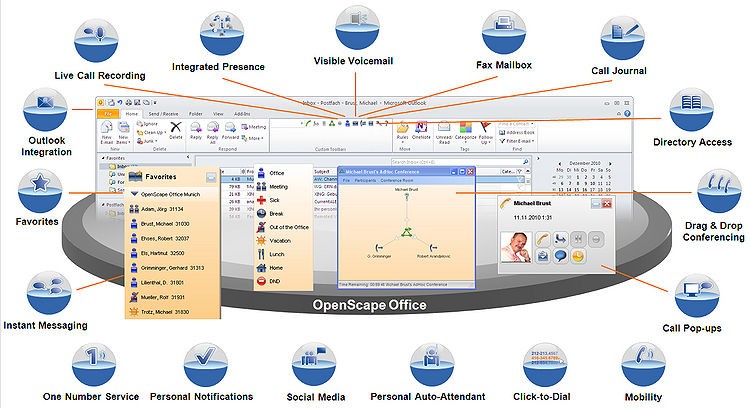
- Unified Communication & Collaboration
- Presence
- Drag & Drop Conferences
- Favorites List
- Directories
- Dialing by Mouse Click
- Call Journal
- Status-Based Call Forwarding
- CallMe
- Personal AutoAttendant
- Popup Window
- Voice- and Faxbox
- Notifications
- Instant Messaging
- Live Call Recording
- Web Collaboration
- Access Protection
- OpenScape Business UC Clients
- myPortal Smart
- myPortal to go
- myPortal for Mobile/Tablet
- myPortal for Desktop
- myPortal for Outlook
- myPortal for OpenStage
- UC Client Performance Features
- Multimedia Contact Center Increase Reachability and Customer Service
- Intelligent Call Distribution
- Flexible Queue Options
- Agent in Multiple Groups
- Wallboard
- Caller List
- Preferred Agent
- VIP Support
- Call Number-Dependent Voice Guidance
- Wrap-Up
- Authorization Level
- Administration of the Contact Center
- Contact Center Clients
- Attendants and Company AutoAttendant
- Business Attendant
- myAttendant
- Company AutoAttendant
- Client Requirements
- Mobility Solutions
- Mobility on the Road
- Mobility in the Office
- Mobility at Home
- Networking of OpenScape Business
- Network-Wide Voice and UC Features
- OpenScape Business Model Versions
- OpenScape Business X3/X5/X8 Hardware Models
- OpenScape Business S Software Model
- Interfaces for Integration in Business Applications
- CTI Middleware
- Interfaces and Protocols
- OpenStage Gate View
- Maintenance and Administration
- OpenScape Business EMC Classes
- OpenScape Business Demonstration
- Ethernet
- IP/Routing
- NAT
- IPSec
- SNMP
- QoS
- Services
- Codecs
- CTI
- VoIP over SIP
- VoIP Security
- XMPP

OpenScape X5
- All-in-one solution for small and medium-sized enterprises
- Uniform solution architecture
- Unified Communication & Collaboration
- Drag & Drop Conferences
- Directories
- Dialing by Mouse Click
- Status-Based Call Forwarding
- Personal AutoAttendant
- Popup Window
- Voice- and Faxbox
- Instant Messaging
- Live Call Recording
- Web Collaboration
- OpenScape Business UC Clients
- myPortal Smart
- myPortal for Mobile/Tablet
- myPortal for Desktop
- myPortal for Outlook
- myPortal for OpenStage
- UC Client Performance Features
- Intelligent Call Distribution
- Agent in Multiple Groups
- Wallboard
- Caller List
- Preferred Agent
- VIP Support
- Call Number-Dependent Voice Guidance
- Administration of the Contact Center
- Contact Center Clients
- Attendants and Company AutoAttendant
- Business Attendant
- Company AutoAttendant
- Mobility Solutions
- Mobility on the Road
- Mobility in the Office
- Mobility at Home
- Networking of OpenScape Business
- Network-Wide Voice and UC Features
- Interfaces for Integration in Business Applications
- CTI Middleware
- OpenStage Gate View
- VoIP Security

OpenScape Office MX
OpenScape Office MX is easy to install and fits quickly and elegantly onto any IP network for on-site installation in just a couple of hours. There are no additional boxes or applications to stock purchase or install. Web-based management and intuitive wizards make it easy to configure, use and maintain and it can easily be scaled from 20 up to150 users, as your customer. And with such easy installation and maintenance, your support time will be reduced, saving you money too.